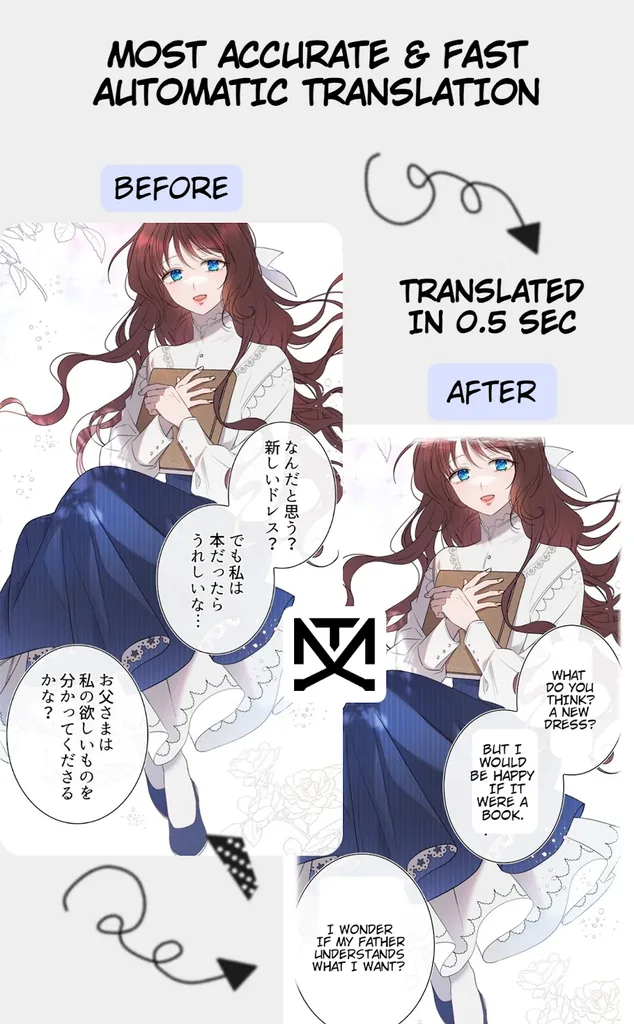
If you read raw manga, manhwa, or manhua, you already know the pain: the story you want is out in Japanese, Korean, or Chinese, and the English scanlation either doesn’t exist yet or is months behind. You could copy every speech bubble into a translator app, but that’s a miserable way to read a chapter. This manga translator mod apk takes a different route — it detects the text right inside the comic panels, translates it, and draws the translated dialogue back onto the page so you can keep reading without switching apps.
In this APKPoor guide, I’ll walk you through exactly what the manga translator mod apk does, what “Premium Unlocked” actually changes versus the free version, how it stacks up against the other manga translation apps on the Play Store, and how to install the file from this page safely. Everything below is based on the real app by kandurr (package com.wiryaimd.mangatranslator, v3.1) — no inflated claims, no invented feature lists.
What Is Manga Translator MOD APK?
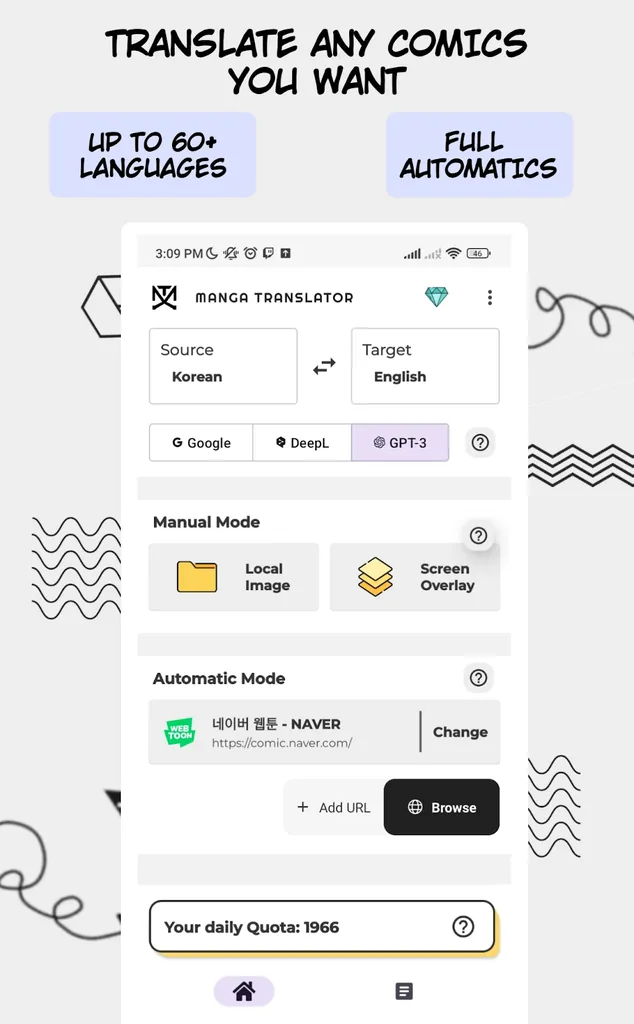
Manga Translator MOD APK is a modified build of the Manga Translator – Translate app (com.wiryaimd.mangatranslator) by kandurr, listed on third-party mod catalogs with Premium Unlocked — meaning the app’s paid premium features, normally sold as in-app purchases, are unlocked without paying. The base app is an AI-powered comic translator: it recognizes text inside manga, manhwa, and webtoon images using OCR, translates Japanese, Korean, Chinese, and 50+ other languages, and redraws the translated dialogue onto the page. It works through a floating screen overlay, an in-app browser for comic sites, or direct image/chapter-URL input, and it saves your translated pages to a local history. The free Play Store version runs on daily translation quotas and shows ads; the mod build on this page removes those limits.
Manga Translator App Info
| Detail | Information |
|---|---|
| App name | Manga Translator – Translate |
| Developer | kandurr |
| Package name | com.wiryaimd.mangatranslator |
| Version on this page | v3.1 (mod build, Premium Unlocked) |
| Play Store version | 3.1 (last updated August 24, 2026) |
| Category | Comics |
| Rating | 3.2 out of 5 (about 1,600 ratings) |
| Installs | 280,000+ (100,000+ bracket on Play) |
| Size | ~125 MB |
| Requires Android | 8.1 and up |
| Content rating | Everyone |
| On Google Play since | July 2021 |
| Ads / In-app purchases | Free version contains ads; in-app purchases $0.99–$49.00 (unlocked in this mod build) |
Sources: AppBrain listing for com.wiryaimd.mangatranslator (stats current as of October 2026), APKMody app info (v3.1, 125 MB, Everyone), MODYOLO mod listing (Premium Unlocked). All stats below describe the base app behind this manga translator mod apk.
Manga Translator MOD APK Features
Here’s the honest answer first: the app’s translation quality lives and dies by your source images. Clean, high-resolution pages with standard fonts translate well; blurry, low-contrast scans with stylized lettering will produce weird output no matter which version you install. That’s true of every app in this category, not just this one. With that out of the way, here’s what this manga translator mod apk actually gives you:
Screen overlay mode
This is the standout feature and the main reason people hunt down this manga translator mod apk instead of settling for a plain translator. The overlay is a floating tool that watches your screen: open any manga page — in a browser, a reader app, your gallery — trigger the overlay, and it recognizes the visible page, translates it, and draws the translation over the image. You don’t leave the screen you’re reading. It’s genuinely convenient for reading raws on sites that don’t have their own translation.
Automatic text detection and redrawing
Feed the app an image and it auto-detects text regions (speech bubbles, captions, sound-effect text), runs OCR, translates, and redraws the translated text back into the page automatically. You don’t manually select each bubble. In practice, detection works best on cleanly typeset dialogue; decorative or hand-lettered text gets skipped or misread, and the redrawn text sometimes overlaps artwork. Still, it’s the fastest hands-off workflow in this niche, and it’s the core reason this manga translator mod apk exists.
Multiple translation engines
The app lets you switch between Google, DeepL, and GPT-3 as the translation engine, and a recent update added Gemini fixes and an improved OCR model. This matters more than it sounds: machine translation quality varies a lot by language pair, and GPT-3/DeepL often produce more natural dialogue than the default engine for Japanese-to-English. This manga translator mod apk build unlocks the premium engine options and higher-quality models that the free version gates behind its paid tier.
In-app comic browser and chapter URLs
Paste the URL of a comic chapter and this manga translator mod apk pulls the pages and translates them automatically, or browse comic sites inside the built-in browser with translation applied as you read. If you read on Naver Webtoon-style sites or raw aggregators, this removes the screenshot-and-import dance entirely.
60+ languages, local history, no forced account wall
The app translates from Japanese, Korean, Chinese, English, and dozens more into 60+ target languages. Translated results save locally and land in a History tab you can reorder and revisit, and your daily translation quota is shown up front in the app so you know where you stand. One practical note: this manga translator mod apk build has Premium Unlocked, which lifts the daily quota caps and removes ads — those two limits are the real friction in the free version.
What “Premium Unlocked” means here
On the Play Store, this app is free with ads and in-app purchases from $0.99 to $49.00. The free tier rations you with a daily translation quota and ads; premium removes the caps, unlocks the better AI engines, and drops the ads. The mod build floating on APKMody, MODYOLO, LiteAPKs, and Platinmods is listed with Premium Unlocked — premium features available without paying. Per our standard practice: we didn’t crack or verify the unlock mechanism ourselves; we downloaded the build from a catalog that lists it as such and checked that it’s a valid, uncorrupted APK for the correct app (package com.wiryaimd.mangatranslator).
| Free version (Play Store) | This manga translator mod apk | |
|---|---|---|
| Price | Free | Free |
| Ads | Yes | Removed |
| Daily translation quota | Capped | Uncapped |
| Premium engines (DeepL, GPT-3) | Paid unlock | Unlocked |
| In-app purchases | $0.99–$49.00 | Not needed |
Manga Translator vs Other Manga Translation Apps
The short version: this manga translator mod apk is the oldest and most-installed dedicated manga translator on this list, but its 3.2-star rating is the weakest — users complain about quota limits and inconsistent OCR. If ratings matter to you, Mangu and OpenToon both sit at 4.5 stars with their users; if you want the newest fast-growing option, OpenToon is worth a look. Here’s the data:
| App | Developer | Rating | Installs | Standout point |
|---|---|---|---|---|
| Manga Translator – Translate (this page) | kandurr | 3.2 / 5 (~1,600 ratings) | 280K+ | Floating screen overlay; Google/DeepL/GPT-3 engines; chapter-URL input |
| OpenToon – Manga Translator | OpenNovel | 4.5 / 5 (~5,200 ratings) | 94K+ | Fastest-growing rival; paste-URL workflow; editable text bubbles |
| Manga Translator AI: Mangu | Matlub Yazılım A.Ş. | 4.5 / 5 (~600 ratings) | 47K+ | Highest-rated translator here; Webtoon/Mangaline reading built in |
| Madomi: Read & Translate Manga | Pawaka Labs | 3.6 / 5 (~500 ratings) | 54K+ | Read + translate in one real-time view |
| Manga Translator – IsManga | IsManga | 2.7 / 5 (~340 ratings) | 76K+ | Browser-based raw reading; 40 free AI translations/week |
Sources: AppBrain pages for each package, stats as of October 2026. Ratings drift over time — check the live Play listings if a number matters to you.
If you’re already deep into manga reading apps generally, you might also like our updated Manga Light and Anime AI posts; novel readers should check GoodNovel and Read Chan.
Manga Translator MOD APK Pros and Cons
No app review is useful without the trade-offs, so here’s the straight version:
Pros
- Screen overlay is genuinely unique — translating pages inside any app without screenshots is something most rivals (OpenToon, Madomi) handle through their own readers instead.
- Multiple engines to choose from — Google, DeepL, and GPT-3 give you a fallback when one engine butchers a particular chapter’s dialogue.
- Chapter-URL input saves real time — paste a link, get translated pages, skip the manual import loop.
- Premium Unlocked removes the two real annoyances — the daily quota cap and the ads in this manga translator mod apk — which are exactly what the 1-star Play reviews complain about.
- Broad language coverage — 60+ target languages is more than most competitors offer.
Cons
- OCR quality is uneven — stylized lettering, vertical text, and low-res scans still trip it up; that’s the main drag on its 3.2-star Play rating.
- Large download — ~125 MB is heavy for a utility app (Mangu is ~58 MB by comparison).
- Machine translation isn’t scanlation — expect readable-but-clunky dialogue, not the polished work of a human translation team. Anyone promising “perfect” MT output is selling you something.
- Mod builds can’t be updated from Play — this manga translator mod apk won’t receive Play Store updates; you’ll need to come back here for newer versions, and Play Protect will flag the sideloaded file (normal for any APK installed outside the store).
How to Install Manga Translator MOD APK
Installing this manga translator mod apk takes about two minutes. The manga translator mod apk file on this page is an XAPK-style bundle (~125 MB), so read step 4 carefully.
- Download the file using the button below — “Manga Translator MOD APK (v3.1 Premium Unlocked)”.
- On your phone, open Settings → Security and allow Install unknown apps for your browser (Chrome, usually). Android blocks sideloading by default; this is the standard toggle for it.
- Open the downloaded file. If Play Protect shows a warning, that’s expected for any APK installed outside Google Play — tap Install anyway only if you downloaded the file from this page.
- If your installer can’t handle the bundle directly, use the free SAI (Split APKs Installer) app from the Play Store to install it — that’s what the file format is designed for.
- Open the manga translator mod apk, pick your source and target languages, and start translating. The overlay permission prompt appears the first time you use screen-overlay mode — grant it or that feature won’t work.
Note: if you already have the Play Store version installed, uninstall it first — Android won’t install a differently-signed build over the original, and you’ll get a signature-conflict error.
Manga Translator MOD APK FAQs
What is Manga Translator MOD APK?
Manga Translator MOD APK is a modified build of the Manga Translator – Translate app (com.wiryaimd.mangatranslator) by kandurr, distributed on mod catalogs with Premium Unlocked. It translates text inside manga, manhwa, and webtoon images — detecting speech bubbles via OCR, translating Japanese/Korean/Chinese and 50+ other languages, and redrawing the translated dialogue onto the page. The mod build unlocks the premium features (no daily quota caps, no ads, premium AI engines) that the free Play Store version sells as in-app purchases.
Is the Premium really unlocked in this manga translator mod apk?
The build is listed as “Premium Unlocked” on the catalogs we sourced it from (MODYOLO, APKMody, LiteAPKs, Platinmods). What that means in practice: the daily translation quota limits and ads from the free version are removed, and the premium translation engines (DeepL, GPT-3) are available. We sanity-checked the file — valid APK structure, correct package name, not corrupted — but we don’t independently verify server-side premium flags, and neither should you trust any site that claims it “tested” them.
Is Manga Translator MOD APK safe to install?
The file on this page passed a basic sanity check: it’s a valid, uncorrupted package for com.wiryaimd.mangatranslator. That said, any APK from outside Google Play bypasses Play’s screening, so keep your expectations realistic — install only from pages you trust, keep Play Protect enabled for on-device scanning, and don’t grant permissions the app doesn’t need. The overlay permission is legitimately required for screen-overlay mode; anything else (contacts, SMS) would be a red flag.
Why does Play Protect warn about this manga translator mod apk?
Play Protect flags every APK installed outside the Play Store — that’s its job, and it happens with perfectly legitimate sideloaded apps too. The warning doesn’t mean the file is malicious; it means Google didn’t review this specific build. If you downloaded it from this page, you can proceed with “Install anyway.”
Which languages does Manga Translator support?
In this manga translator mod apk, source languages include Japanese, Korean, Chinese, and English; target languages number 60+, covering French, German, Spanish, Portuguese, Russian, Arabic, Indonesian, Turkish, Vietnamese, Thai, Hindi, and more. Translation quality varies by language pair — Japanese-to-English and Korean-to-English are the most-used and best-tuned paths.
Can I use this manga translator mod apk without the internet?
Mostly no. OCR and the AI translation engines run server-side, so you need a stable connection for translations. This is a real limitation versus something like Mangra, which offers an on-device offline engine. Don’t expect this manga translator mod apk to work on airplane mode.
Will this manga translator mod apk update automatically?
No. Sideloaded builds don’t receive Play Store updates. When the developer releases a new version (the Play build was at v3.1 as of August 2026), you’ll need to download the newer mod build from a catalog and install it over this one. Bookmark this page and check back.
What’s the difference between this and the free Play Store version?
The Play Store version is free with ads, a daily translation quota, and in-app purchases ($0.99–$49.00) for premium. This manga translator mod apk is the same app with those premium gates unlocked — no quotas, no ads, premium engines available. The underlying translation technology is identical; only the paywalls differ.
Verdict: Should You Download Manga Translator MOD APK?
Here’s my take: if you read raws regularly and you’re tired of the free version’s daily quota cutting you off mid-chapter, this manga translator mod apk is the pragmatic choice — Premium Unlocked removes exactly the limits that make the free tier frustrating, and the screen-overlay mode is still the most convenient way to read translations inside whatever app or site you already use. The 3.2-star Play rating is a fair warning that OCR and MT quality won’t blow you away, but for a free tool that turns unreadable raws into readable chapters in seconds, it earns its place.
One caveat worth repeating: machine translation gives you the gist, not the art. If a series matters to you, support the official release when it exists. For everything else — the untranslated backlog, the raws three chapters ahead — this manga translator mod apk gets the job done.

All Versions